<?xml version="1.0" encoding="utf-8"?><feed xmlns="http://www.w3.org/2005/Atom" ><generator uri="https://jekyllrb.com/" version="3.10.0">Jekyll</generator><link href="https://abefehr.com/feed.xml" rel="self" type="application/atom+xml" /><link href="https://abefehr.com/" rel="alternate" type="text/html" /><updated>2026-04-28T04:42:42+00:00</updated><id>https://abefehr.com/feed.xml</id><title type="html">Abe Fehr</title><subtitle>I&apos;m a Software Engineer at &lt;a href=&quot;https://www.wealthsimple.com/&quot;&gt;Wealthsimple&lt;/a&gt;. I enjoy many facets of Computer Science and Mathematics including Software Engineering, Algorithms, and recently, Deep Learning. As part of a work-study program I&apos;ve worked at &lt;a href=&quot;http://www.ibm.com/ca-en/&quot;&gt;IBM&lt;/a&gt; and &lt;a href=&quot;http://ca.blackberry.com/home.html&quot;&gt;BlackBerry&lt;/a&gt;, and &lt;a href=&quot;https://www.studeersnel.nl/&quot;&gt;StudeerSnel&lt;/a&gt;.</subtitle><entry><title type="html">Early Impressions of Chrome from a Firefox User</title><link href="https://abefehr.com/posts/early-impressions-of-chrome" rel="alternate" type="text/html" title="Early Impressions of Chrome from a Firefox User" /><published>2026-04-28T00:00:00+00:00</published><updated>2026-04-28T00:00:00+00:00</updated><id>https://abefehr.com/posts/early-impressions-of-chrome</id><content type="html" xml:base="https://abefehr.com/posts/early-impressions-of-chrome"><![CDATA[<p>I’ve used Firefox for many years now, but I had to switch to Chrome recently on my work computer for corporate reasons.</p>

<p>It’s only been about a week but I’ve already developed a set of opinions on features that I miss from Firefox…and a few things that I actually like better about Chrome.</p>

<h2 id="what-i-dont-like-about-chrome">What I don’t like about Chrome</h2>

<h3 id="unpredictable-autocomplete-behaviour">Unpredictable autocomplete behaviour</h3>

<p>This has to be one of the biggest sources of friction for me right now because my muscle memory was so finely tuned to Firefox’s autocomplete behaviour.</p>

<p>My company uses GitHub, and that means that our repositories have predictable URLs in the form <code class="language-plaintext highlighter-rouge">github.com/company/repository-name</code>. There’s also other GitHub pages that I frequent like <code class="language-plaintext highlighter-rouge">github.com/issues</code> or <code class="language-plaintext highlighter-rouge">github.com/pulls</code>.</p>

<p>In Firefox, when you start typing <code class="language-plaintext highlighter-rouge">github.com</code> it autocompletes with the trailing slash, which allows you to select it and start typing the next segment, and so on.</p>

<p>For example, this means to get to <code class="language-plaintext highlighter-rouge">github.com/company/front-end</code> you can do:</p>

<p><kbd>g</kbd><kbd>i</kbd><kbd>→</kbd><kbd>c</kbd><kbd>→</kbd><kbd>f</kbd><kbd>enter</kbd></p>

<p>Or to view my pull requests at <code class="language-plaintext highlighter-rouge">github.com/pulls</code>:</p>

<p><kbd>g</kbd><kbd>i</kbd><kbd>→</kbd><kbd>p</kbd><kbd>enter</kbd></p>

<p>In Chrome, I have <em>no idea</em> what the autocomplete behaviour is.</p>

<p>I’ve visited our repo URLs many times in Chrome and had Chrome to the point where typing <kbd>g</kbd><kbd>i</kbd> autofilled my most visited repo URL, which would’ve been fine behaviour. But today I visited <code class="language-plaintext highlighter-rouge">githubstatus.com</code> to check out the daily GitHub outage, and now every time I type <kbd>g</kbd><kbd>i</kbd> in the address bar it prefills to <code class="language-plaintext highlighter-rouge">githubstatus.com</code>, and I can’t get it to stop recommending it!</p>

<p>I’ve done some initial research to see if you can enable the Firefox autocomplete behaviour in Chrome, but for some reason every article seems to be asking how to port the Chrome autocomplete to Firefox instead. Insane!</p>

<h3 id="no-native-picture-in-picture">No native picture-in-picture</h3>

<p>I frequently have YouTube videos on in the background while I work, and sometimes it’s nice to have them playing picture-in-picture.</p>

<p>After realizing that Chrome didn’t seem to have picture-in-picture built in I looked for a solution and, luckily enough, there’s an <a href="https://chromewebstore.google.com/detail/picture-in-picture-extens/hkgfoiooedgoejojocmhlaklaeopbecg?hl=en">official Chrome extension</a> to enable this functionality. I have no idea why they didn’t just build this into the browser.</p>

<p>In a way this extension is actually more pleasant than Firefox because it automatically switches to picture-in-picture when you tab away from YouTube, but a major drawback is that it doesn’t render YouTube’s subtitles, which is painful when you want to glance to catch a word you missed.</p>

<h3 id="no-native-screenshotting">No native screenshotting</h3>

<p>Today I found myself trying to screenshot a part of a webpage, which is another quality-of-life feature from Firefox.</p>

<p><em>I guess</em> it’s reasonable for Chrome not to include this because you can just take screenshots using the OS’ screenshot utilities, but the screenshot feature in Firefox is perfect for web developers because it lets you choose which element to capture and that becomes the bounding box for the capture.</p>

<p>In Chrome, if you have an always-on-top window above the page (like the aforementioned picture-in-picture overlay) and wanted to use the OS’ screenshot utilities, you’d have to move the overlay to the side or else it would wind up in the screenshot.</p>

<p>Plus, if you want to compare the before-and-after of a particular element it’s nice to capture the exact bounding box of the div, rather than having to approximately drag a box twice in a row, just for the screenshots differently sized and hard to compare nicely.</p>

<p>I think there are Chrome extensions that provide some screenshotting functionality, but it seems silly not to build this feature right into the browser.</p>

<h3 id="tabs-crowd-faster">Tabs crowd faster</h3>

<p>You can have <em>way</em> too many tabs open in Firefox without sacrificing readability of the tab titles, but when you have too many tabs open in Chrome the tabs decrease in width until you can’t see which tab is which.</p>

<figure>
  <img src="/assets/images/early-impressions-of-chrome/50-chrome-tabs.png" alt="Chrome with 50 tabs open" />
  <figcaption>All you get is the favicons with 50 tabs open in Chrome</figcaption>
</figure>

<p>In Firefox you can just scroll left and right to see all the tabs, and again, you <strong>never</strong> lose the tab title.</p>

<figure>
  <img src="/assets/images/early-impressions-of-chrome/50-firefox-tabs.png" alt="Firefox with 50 tabs open" />
  <figcaption>Also 50 tabs, but so much more readable</figcaption>
</figure>

<p>As a bonus, I’d like to point out that hovering over a tab in Firefox shows you a preview of that tab. Considering that Chrome really doesn’t want you to read tab titles the <em>least</em> they could do was the hover preview, but they bungled that too.</p>

<h2 id="where-chrome-might-be-better">Where Chrome might be better</h2>

<h3 id="google-meets-overlay">Google Meets overlay</h3>

<p>When you’re in a Google Meet and you switch tabs, an overlay shows the meeting (complete with chat!) in a little pop up window.</p>

<p>I have no idea what magical API Chrome is using for this, but I’d imagine that it’s similar to whatever’s powering their picture-in-picture extension. It must be limited to only Google products or else everyone in the world would be using it to make annoying always-on-top popups.</p>

<h3 id="things-feel-smoother">Things “feel” smoother</h3>

<p>This isn’t a particularly well researched point and is mostly vibes-based, but I find that GitHub Workflows with an enormous number of logs actually scroll more smoothly in Chrome than in Firefox. I <em>think</em> I’ve noticed other sites performing more smoothly as well, but it’s all anecdotal so I can’t really say for sure.</p>

<h3 id="copy-styles-button">Copy styles button</h3>

<p>Before I started to use Chrome regularly, I made an interactive replica of the GitHub merge queue page to record an educational video about how merge queues work. To mimic the page’s exact style, the workflow I used was to right-click the element in Chrome Dev Tools -&gt; Copy -&gt; Copy styles, which was a faster workflow than any method I could find in Firefox.</p>

<p>Arguably this feature is probably only useful if you’re copying a website, but if you have a good reason to do it (hopefully not phishing!) then I can recommend this solution.</p>

<h2 id="who-really-knows">Who really knows</h2>

<p>At a week in, I’m still early in my Chrome journey and maybe there are solutions to my problems that I haven’t stumbled across yet.</p>

<p>All in all, I’m looking forward to <a href="https://ladybird.org/">Ladybird</a> to add some much-needed competition to the browser landscape.</p>]]></content><author><name></name></author><summary type="html"><![CDATA[I’ve used Firefox for many years now, but I had to switch to Chrome recently on my work computer for corporate reasons.]]></summary></entry><entry><title type="html">Globbing at the speed of light</title><link href="https://abefehr.com/posts/globbing-at-the-speed-of-light" rel="alternate" type="text/html" title="Globbing at the speed of light" /><published>2026-04-11T00:00:00+00:00</published><updated>2026-04-11T00:00:00+00:00</updated><id>https://abefehr.com/posts/globbing-at-the-speed-of-light</id><content type="html" xml:base="https://abefehr.com/posts/globbing-at-the-speed-of-light"><![CDATA[<p>When writing tools for developers, it’s often useful to write scripts that look at many files in a codebase.</p>

<p>The first choice in Javascript might be the <a href="https://www.npmjs.com/package/glob"><code class="language-plaintext highlighter-rouge">glob</code></a> package, but I quickly found out that it was too slow.</p>

<p><a href="https://www.npmjs.com/package/fast-glob"><code class="language-plaintext highlighter-rouge">fast-glob</code></a> is faster, but <a href="https://www.npmjs.com/package/globby"><code class="language-plaintext highlighter-rouge">globby</code></a> is even better because it supports a <code class="language-plaintext highlighter-rouge">gitignore</code> option.</p>

<p>Still, globbing in a large repo (~6 million LOC) was taking ~3-4 seconds on my 10-core M3 Macbook.</p>

<p>I discovered a neat trick though: you can use <code class="language-plaintext highlighter-rouge">git ls-files</code> (and <code class="language-plaintext highlighter-rouge">picomatch</code>) for <em>really</em> fast globbing.</p>

<p>Here’s what this looks like in Node:</p>

<div class="language-javascript highlighter-rouge"><div class="highlight"><pre class="highlight"><code><span class="k">import</span> <span class="p">{</span> <span class="nx">spawn</span> <span class="p">}</span> <span class="k">from</span> <span class="dl">'</span><span class="s1">node:child_process</span><span class="dl">'</span><span class="p">;</span>
<span class="k">import</span> <span class="nx">picomatch</span> <span class="k">from</span> <span class="dl">'</span><span class="s1">picomatch</span><span class="dl">'</span><span class="p">;</span>

<span class="kd">const</span> <span class="nx">isMatch</span> <span class="o">=</span> <span class="nx">picomatch</span><span class="p">(</span>
  <span class="dl">'</span><span class="s1">{@types,apps,libs,tools,toolchain/**/*.{ts,tsx,js,jsx}}</span><span class="dl">'</span>
<span class="p">)</span>

<span class="kd">const</span> <span class="nx">paths</span> <span class="o">=</span> <span class="p">[];</span>
<span class="kd">const</span> <span class="nx">gitProcess</span> <span class="o">=</span> <span class="nx">spawn</span><span class="p">(</span><span class="dl">'</span><span class="s1">git</span><span class="dl">'</span><span class="p">,</span> <span class="p">[</span><span class="dl">'</span><span class="s1">ls-files</span><span class="dl">'</span><span class="p">],</span> <span class="p">{</span>
  <span class="na">stdio</span><span class="p">:</span> <span class="p">[</span><span class="dl">'</span><span class="s1">ignore</span><span class="dl">'</span><span class="p">,</span> <span class="dl">'</span><span class="s1">pipe</span><span class="dl">'</span><span class="p">,</span> <span class="dl">'</span><span class="s1">inherit</span><span class="dl">'</span><span class="p">],</span>
<span class="p">});</span>

<span class="kd">let</span> <span class="nx">buffer</span> <span class="o">=</span> <span class="dl">''</span><span class="p">;</span>
<span class="k">for</span> <span class="k">await</span> <span class="p">(</span><span class="kd">const</span> <span class="nx">chunk</span> <span class="k">of</span> <span class="nx">gitProcess</span><span class="p">.</span><span class="nx">stdout</span><span class="p">)</span> <span class="p">{</span>
  <span class="nx">buffer</span> <span class="o">+=</span> <span class="nx">chunk</span><span class="p">.</span><span class="nx">toString</span><span class="p">();</span>
  <span class="kd">const</span> <span class="nx">lines</span> <span class="o">=</span> <span class="nx">buffer</span><span class="p">.</span><span class="nx">split</span><span class="p">(</span><span class="dl">'</span><span class="se">\n</span><span class="dl">'</span><span class="p">);</span>
  <span class="nx">buffer</span> <span class="o">=</span> <span class="nx">lines</span><span class="p">.</span><span class="nx">pop</span><span class="p">()</span> <span class="o">||</span> <span class="dl">''</span><span class="p">;</span>
  <span class="nx">lines</span><span class="p">.</span><span class="nx">filter</span><span class="p">((</span><span class="nx">line</span><span class="p">)</span> <span class="o">=&gt;</span> <span class="nx">isMatch</span><span class="p">(</span><span class="nx">line</span><span class="p">)).</span><span class="nx">forEach</span><span class="p">((</span><span class="nx">line</span><span class="p">)</span> <span class="o">=&gt;</span> <span class="nx">paths</span><span class="p">.</span><span class="nx">push</span><span class="p">(</span><span class="nx">line</span><span class="p">));</span>
<span class="p">}</span>
<span class="k">if</span> <span class="p">(</span><span class="nx">buffer</span> <span class="o">&amp;&amp;</span> <span class="nx">isMatch</span><span class="p">(</span><span class="nx">buffer</span><span class="p">))</span> <span class="p">{</span>
  <span class="nx">paths</span><span class="p">.</span><span class="nx">push</span><span class="p">(</span><span class="nx">buffer</span><span class="p">);</span>
<span class="p">}</span>
</code></pre></div></div>

<p>With this approach I’m able to get a relevant list of paths in milliseconds as opposed to seconds.</p>

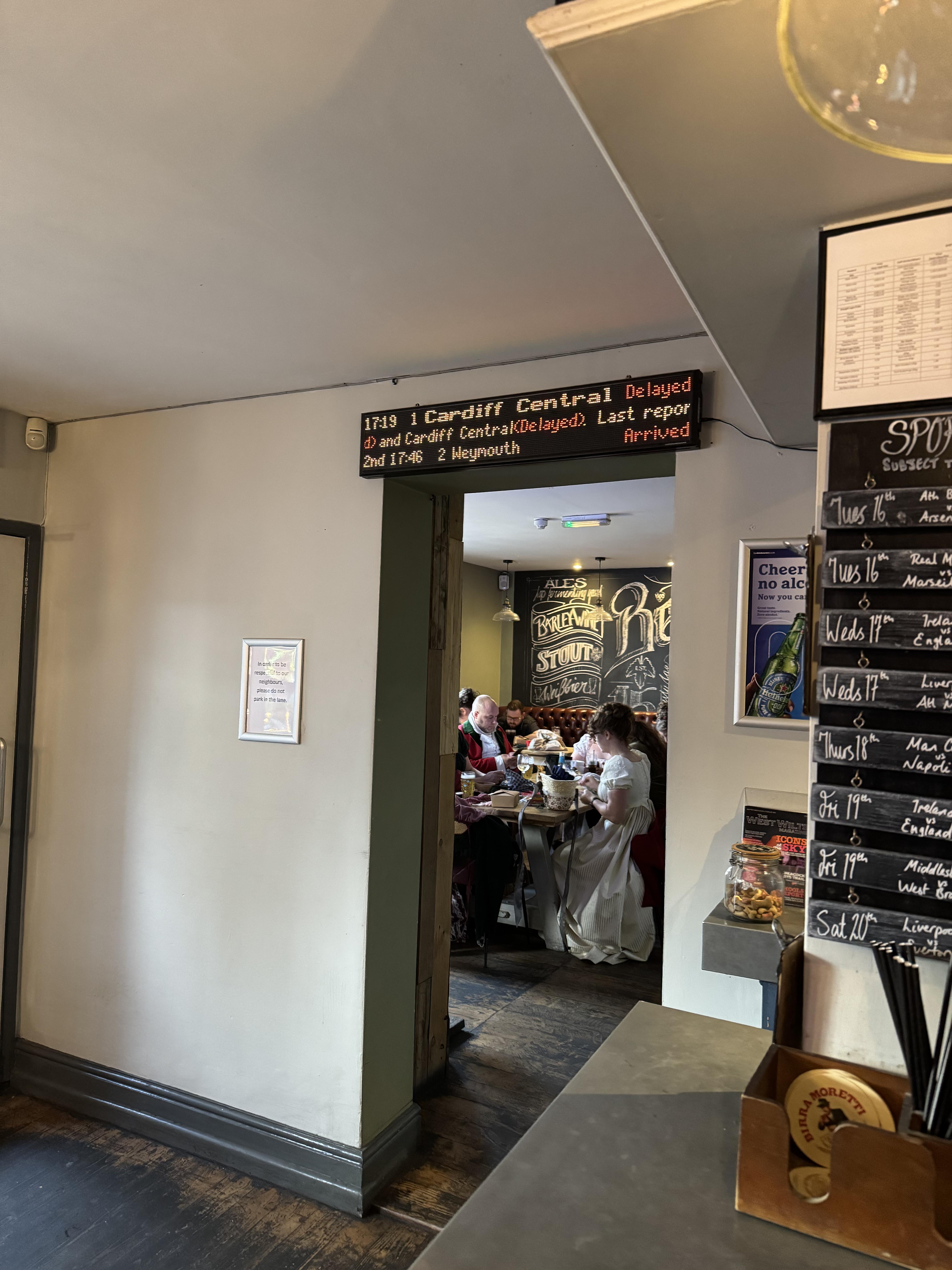
<p>As long as you use git (and depending on the glob pattern) this may work for you as well. Always measure performance!</p>]]></content><author><name></name></author><summary type="html"><![CDATA[When writing tools for developers, it’s often useful to write scripts that look at many files in a codebase.]]></summary></entry><entry><title type="html">Building a desktop train departure sign</title><link href="https://abefehr.com/posts/building-a-desktop-train-departure-sign" rel="alternate" type="text/html" title="Building a desktop train departure sign" /><published>2026-01-20T00:00:00+00:00</published><updated>2026-01-20T00:00:00+00:00</updated><id>https://abefehr.com/posts/building-a-desktop-train-departure-sign</id><content type="html" xml:base="https://abefehr.com/posts/building-a-desktop-train-departure-sign"><![CDATA[<p>Last September during my trip to the UK we became stranded at a small town train station because a tree had fallen on the tracks nearby. After waiting at the station in the rain for much too long, we decided to have a drink at a pub across the street until the service was restored.</p>

<p>At the pub I saw this sign:</p>

<figure>
  <img src="/assets/images/IMG_2969.jpg" alt="Train sign at a pub" />
  <figcaption></figcaption>
</figure>

<p>The sign looked similar to the ones on the platform, but I talked to the owner about it and he said it wasn’t an official sign. He told me that he <a href="https://ukdepartureboards.co.uk/store/">ordered it online</a>.</p>

<p>I thought to myself, it’d be nice to have something like this in my condo so I know when to leave to catch the streetcar.<sup id="fnref:1" role="doc-noteref"><a href="#fn:1" class="footnote" rel="footnote">1</a></sup></p>

<h2 id="existing-train-departure-signs">Existing train departure signs</h2>

<p>Consumed by the idea of having a sign like this in my home, I did some research to see if this kind of thing had been done before. It has (<a href="https://github.com/chrisys/train-departure-display">link</a>, <a href="https://departureboard.jonathanfoot.com/">link</a>), but unfortunately these projects weren’t quite to my liking despite being pretty cool themselves.</p>

<p>I had some specific requirements:</p>

<p><strong>The screen should be bigger than 2 inches.</strong> The existing projects are all tiny, and I felt that I wanted a sign that look like it could (maybe) be an official TTC sign.</p>

<p><strong>The screen should have individual LEDs.</strong> TFT LCD displays are nice, but that’s not the type of look I’m going for here.</p>

<p><strong>The LEDs should be RGB.</strong> This is purely a personal preference, but I felt like the multiple colours of the UK departure board <em>looked really cool</em> and I wanted to have the flexibility of showing a wide range of content later anyway.</p>

<p><strong>The resolution should be at least 256x64.</strong> I wanted the ability to display multiple lines of content at multiple font weights, etc.</p>

<p>Unfortunately, it was very difficult to find a 256x64 display that was bigger than 2 inches wide and smaller than half a metre, so the train sign idea was shelved.</p>

<h2 id="we-have-train-sign-at-home">We have train sign at home</h2>

<p>At Christmas time I became motivated enough again to do something with this idea.</p>

<p>I remembered that I had three old 32x16 HUB75 panels laying around, left over from an old company Hackathon project where I used them for a stock ticker. I also had a few ESP32s which I was reasonably sure could drive them.</p>

<p>After getting my partner’s opinions, I was told that making this sign 3 panels across would be too big, so this sign would have to be 2 panels wide instead.</p>

<h2 id="powering-the-panel">Powering the panel</h2>

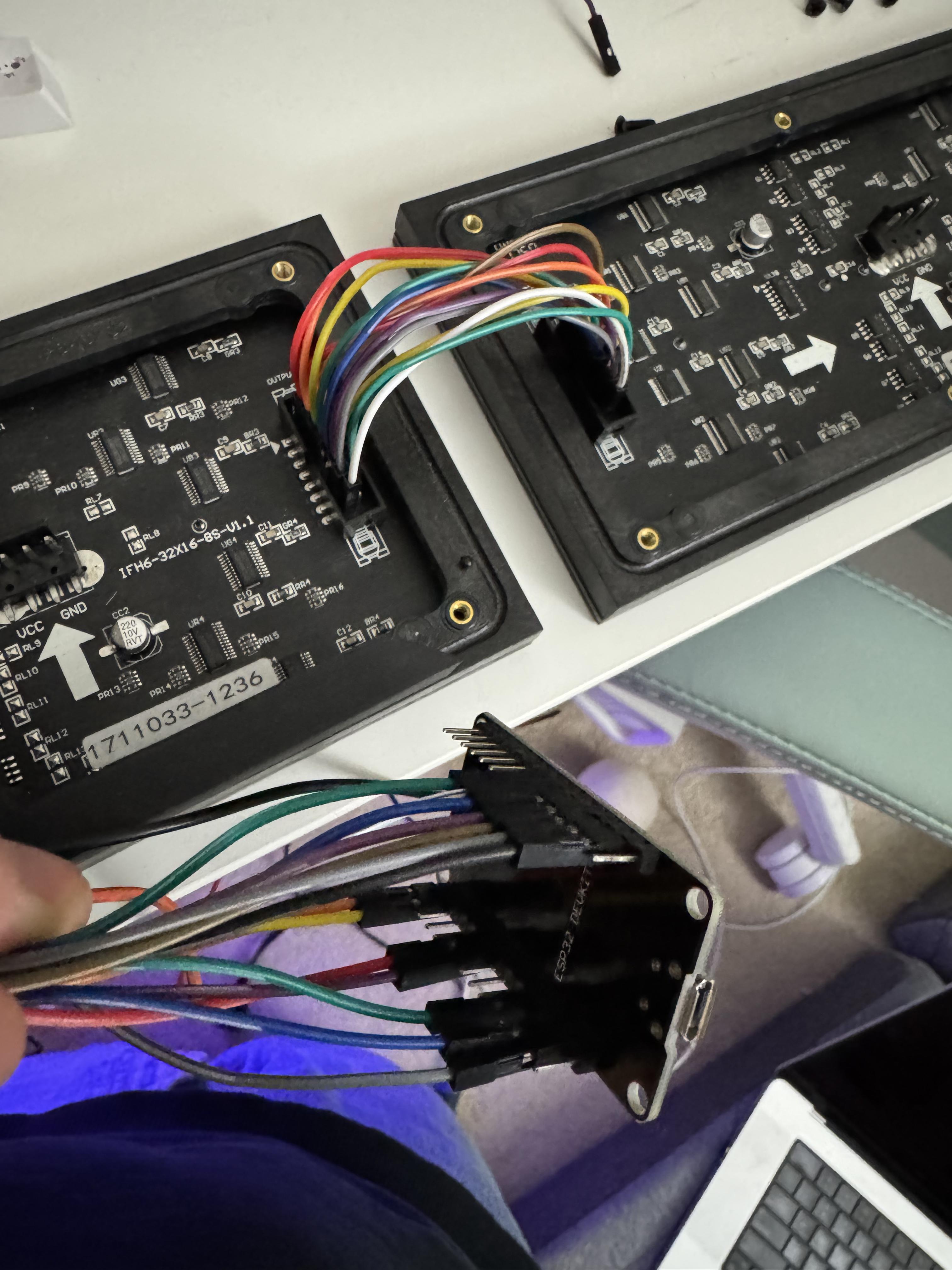
<p>I excitedly wired the panels together using DuPont cables because I’d lost the official Adafruit ribbon cables.</p>

<figure>
  <img src="/assets/images/IMG_4900.jpg" alt="Mess of wires connecting LED panels" />
  <figcaption></figcaption>
</figure>

<p>I am not an electrical engineer by any means, so I was relying a combination of ChatGPT and critical thinking for this project. ChatGPT heavily advised me not to power the panels with the USB cable from my computer: the logic being that each panel can draw up to 4A of current at full brightness, so I needed an 8A power supply.</p>

<p>All the 5V 8A power cables looked excessive, so I pinky promised that I’d never have both panels fully white at maximum brightness and ordered a 4A power supply instead, as well as some <a href="https://learn.sparkfun.com/tutorials/connector-basics/power-connectors">barrel connectors</a>.</p>

<p>I figured that during prototyping I could use one of those fancy variable power supplies that I see electronics people using all the time, so I ordered one of those on Amazon.</p>

<p>Since I didn’t have any means of getting 5V 4A that day (believe me, I checked every USB wall wart in the house) I waited for my power supply and power cable to arrive in the mail.</p>

<h2 id="designing-the-case">Designing the case</h2>

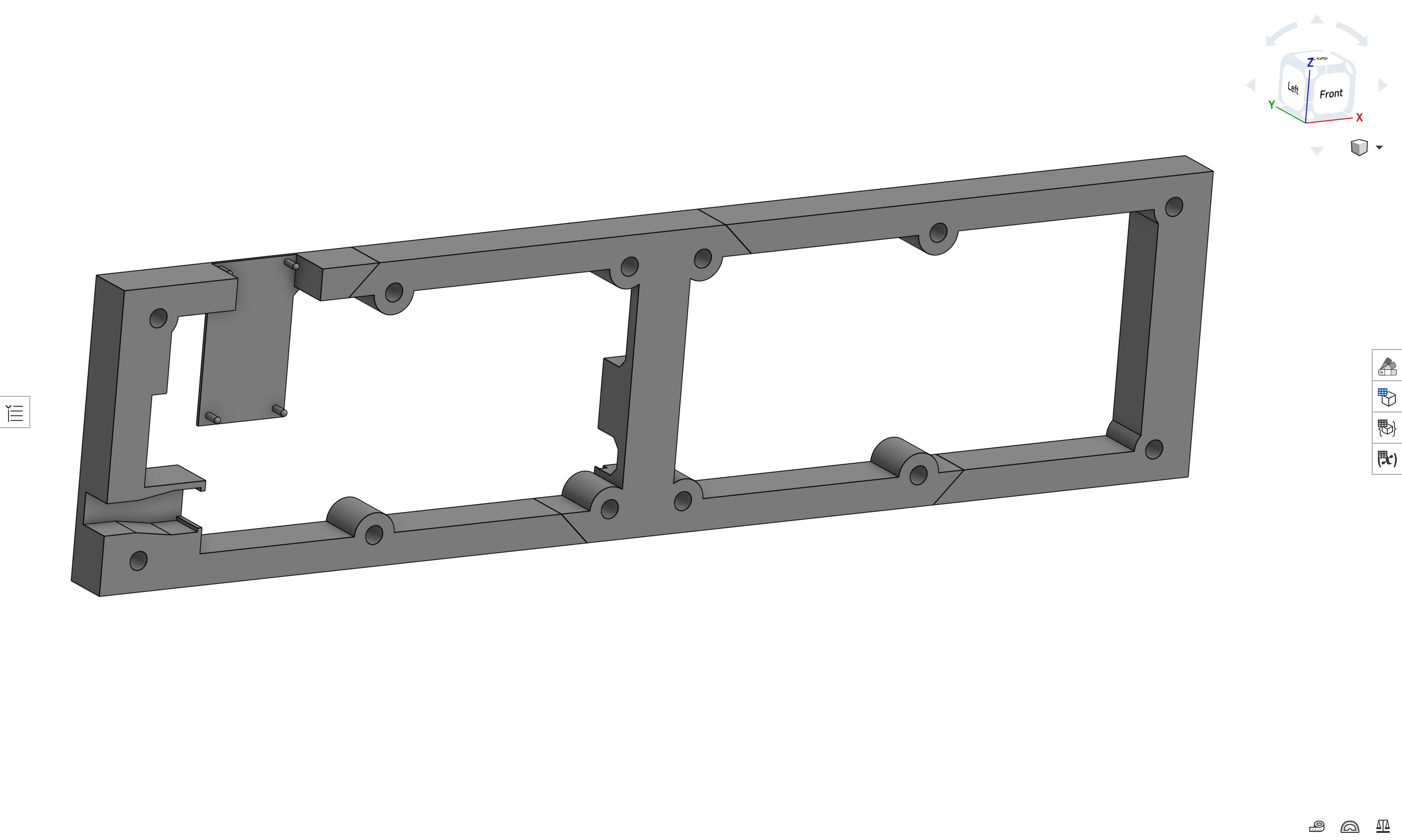
<p>I figured I might as well start designing the 3D printed case while I waited. It’s not really a “case” and more of an open “backer” to contain the mess of wires behind the panels and provide a way to mount it to the wall.</p>

<p>My idea was that I’d hang it using command strips (I rent) so I would design vertical flat space in the back for those to stick to.</p>

<p>Since the LED panels already have threaded screw inserts in them, I could just attach the case to the panels by screwing them in directly.</p>

<p>One design challenge was figuring out how the ESP32 would be fixed to the case. Since the chip doesn’t have attachment points, I ended up making poles for it to sit on, which looked really silly.</p>

<figure>
  <img src="/assets/images/CaseV1.png" alt="3D rendering of LED display shell" />
  <figcaption>This is why I'm not an engineer.</figcaption>
</figure>

<p>Thankfully, the final version of the case ended up looking much cleaner.</p>

<h2 id="programming-the-esp32">Programming the ESP32</h2>

<p>Once my shiny new power cable and variable power supply arrived, I powered up the panels using the alligator cables so I could begin testing the nearly decade-old panels to see if they still even worked.</p>

<h3 id="displaying-text">Displaying text</h3>

<p>I started by trying to display a few lines of text on the panels.</p>

<p>Before AI, I would’ve started by finding some example code that displays text and then adapting it to meet my needs.</p>

<p>But now that we have AI at our disposal, it seemed like a good idea to ask it for an Arduino project that was already adapted to my needs.</p>

<p>This did not end up saving me any time.</p>

<p>AI did output a program that looked correct, and it correctly recommended to use the <a href="https://github.com/mrcodetastic/ESP32-HUB75-MatrixPanel-DMA/tree/master">ESP32-HUB75-MatrixPanel-DMA</a> library, which is arguably <em>the</em> library to use for the ESP32 + HUB75, but nothing that it outputted compiled because it kept hallucinating incorrect header filenames.</p>

<p>In an attempt to compromise with the AI, I asked what version of the library it was familiar with and installed that version instead, but it still didn’t get the header filenames correct. After I gave it the correct header filename, it started hallucinating non-existing APIs.</p>

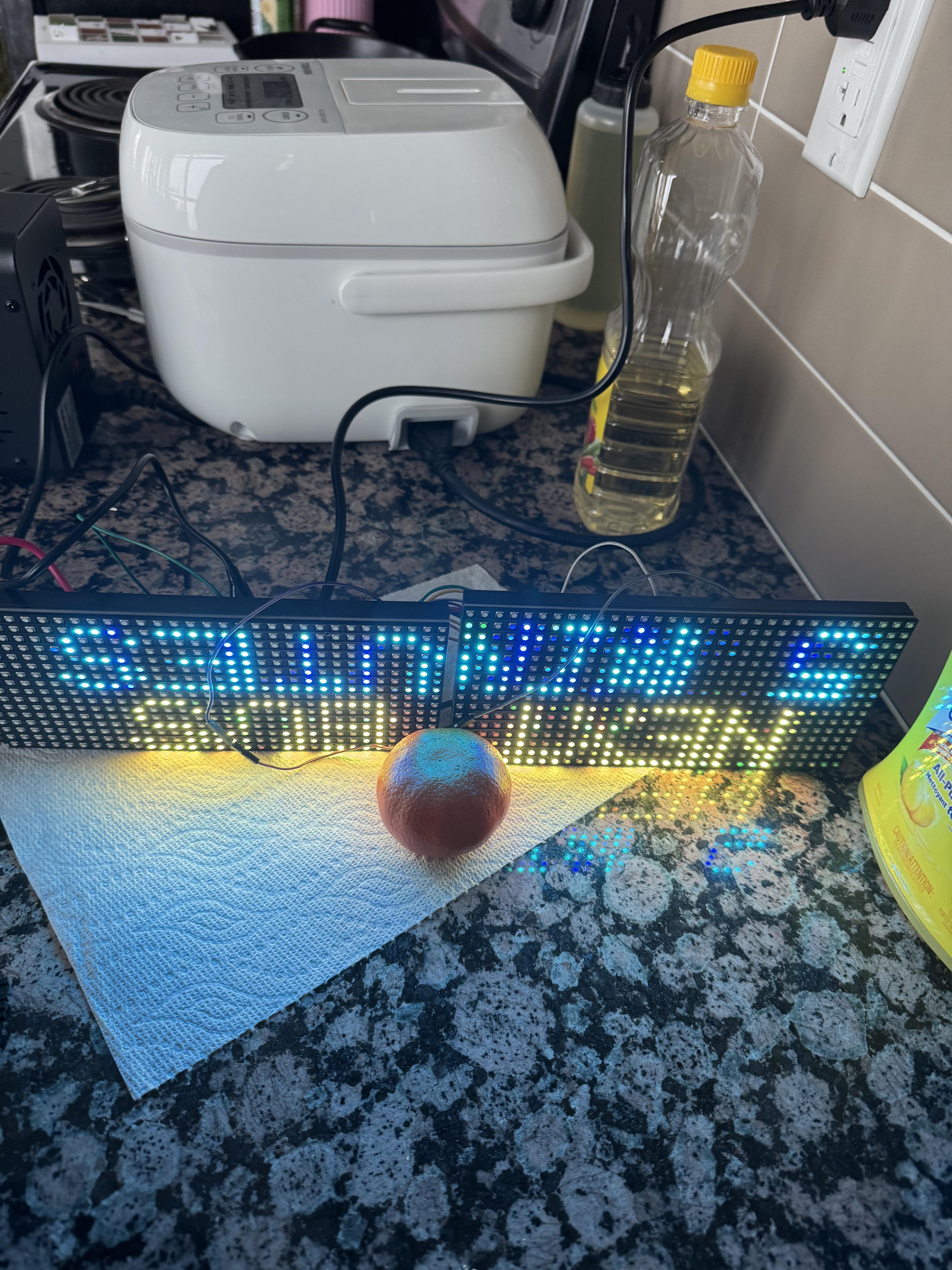
<p>I ended up just using an example project from the library’s repo and basing my output off of that, and if I had done that from the start I would’ve saved a lot of time up front.</p>

<figure>
  <img src="/assets/images/IMG_4892.jpg" alt="LED display on kitchen countertop with orange" />
  <figcaption>The orange is load-bearing.</figcaption>
</figure>

<h2 id="productionizing">Productionizing</h2>

<p>Text now displayed properly on the screen, but there was a blurriness and some flickering.</p>

<p>I reasoned that this must be because the DuPont cables are too small and not shielded properly.</p>

<p>I wanted to start soldering wires together so I could get away from the DuPont cable disaster, but I became a bit overwhelmed and couldn’t see an easy way to make my mess of cables production-ready.</p>

<p>After some research I decided to order some ribbon cables from Amazon to clean up the connection between the two panels, as well as the correct power cable for the panels from Adafruit.</p>

<p>I also discovered the <a href="https://esp32trinity.com/">ESP32-Trinity</a>, an ESP32 that’s designed <em>specifically</em> for use with HUB75 matrix panels and plugs directly into the panels, so I ordered that as well.</p>

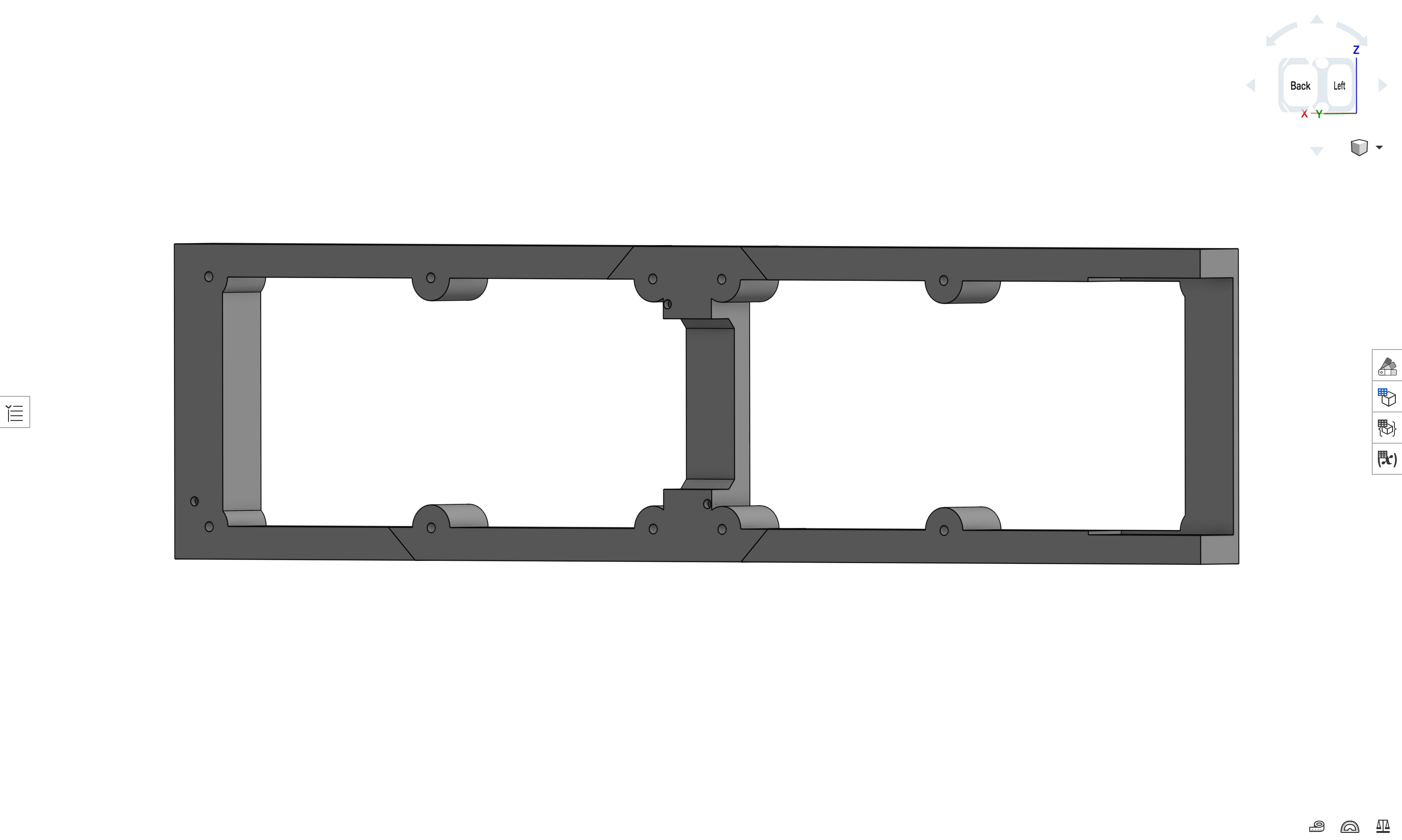
<p>Once I received the Trinity board I took some measurements and greatly simplified my case design.</p>

<figure>
  <img src="/assets/images/CaseV2.png" alt="3D rendering of LED display shell" />
  <figcaption></figcaption>
</figure>

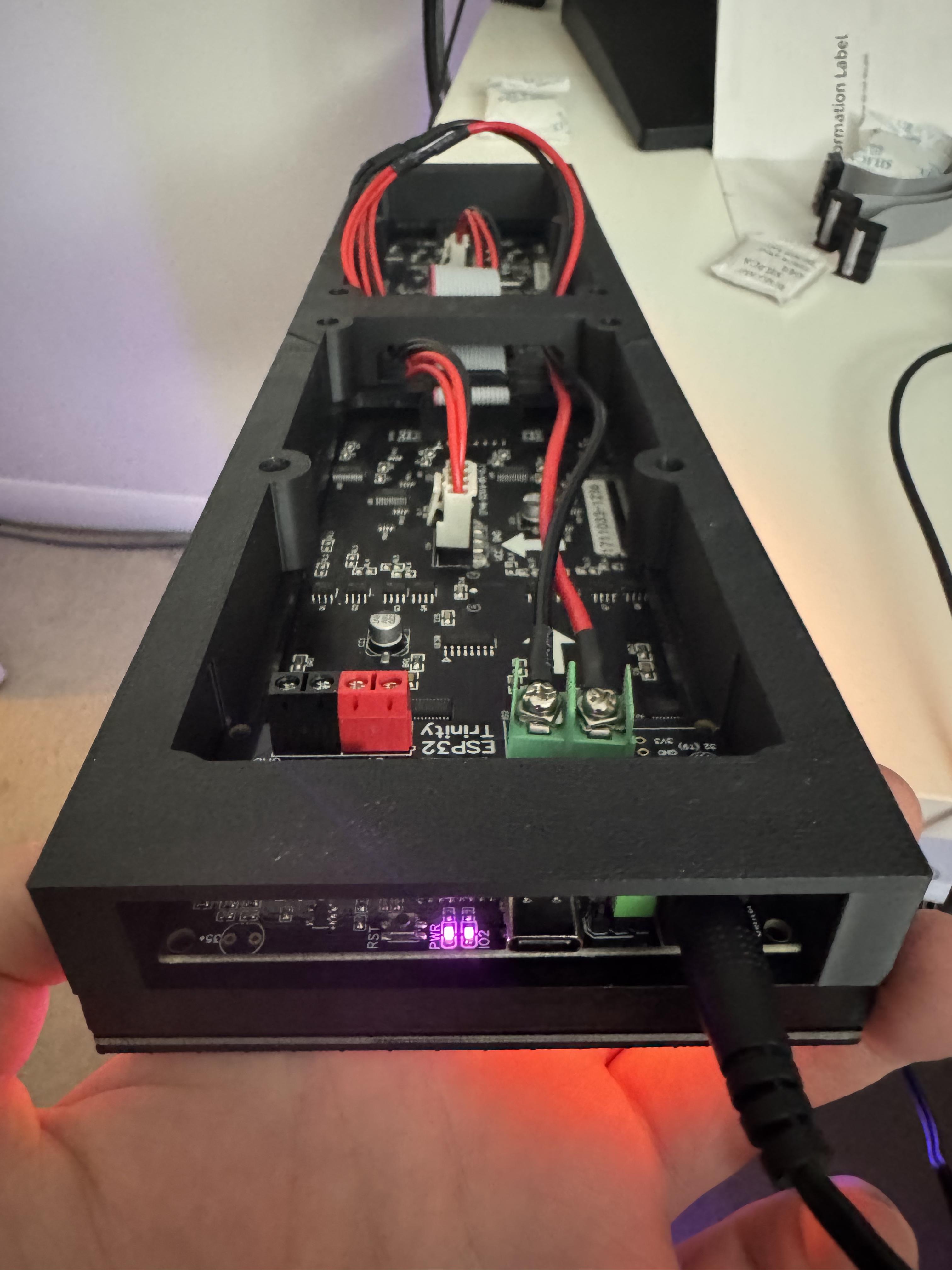
<p>Here’s what it looked like after print and assembly:</p>

<figure>
  <img src="/assets/images/IMG_4962.jpg" alt="Final product in the case" />
  <figcaption></figcaption>
</figure>

<h3 id="sourcing-streetcar-times">Sourcing streetcar times</h3>

<p>To fetch streetcar times I planned on using whatever API <a href="https://tobus.ca/">tobus.ca</a> was using, because I find their times to be accurate and I like their to-the-second estimates.</p>

<p>AI was really helpful for writing the logic to fetch updated times every 30 seconds and parsing the JSON that came back to display.</p>

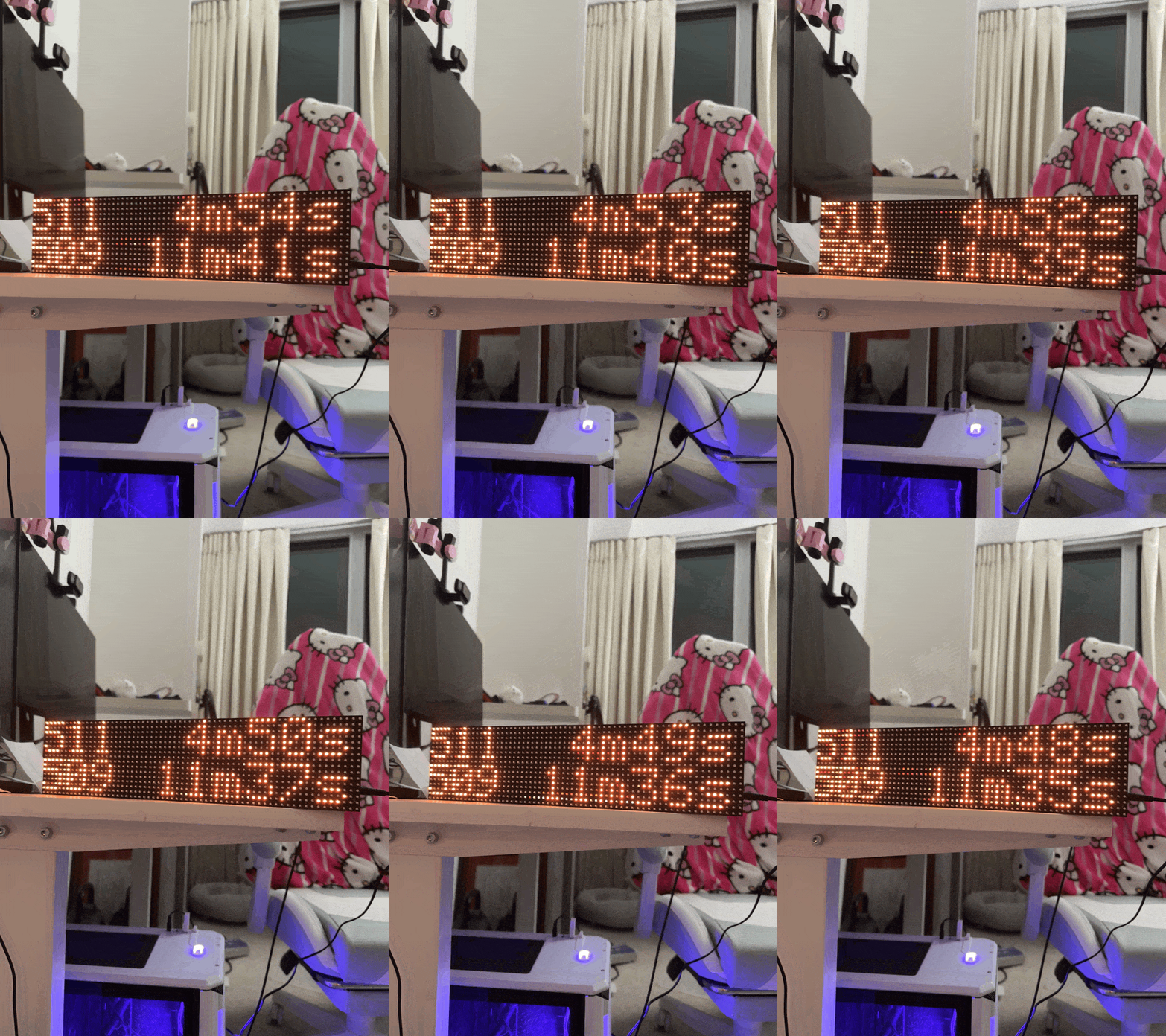
<p>Sorting the times and formatting the text was simple, and I ended up going with this format:</p>

<div class="language-plaintext highlighter-rouge"><div class="highlight"><pre class="highlight"><code>###  MMm:SSs
###  MMm:SSs
</code></pre></div></div>

<p>where <code class="language-plaintext highlighter-rouge">###</code> is the streetcar line number and <code class="language-plaintext highlighter-rouge">MMm:SSs</code> is the to-the-second time until the next streetcar.</p>

<p>It displays the next 2 streetcars regardless of line number at my local stop, but filters out any streetcars that are less than 3 minutes away, because there’s no way I can get outside to the stop in less than 3 minutes.</p>

<h2 id="debugging-the-hardware">Debugging the hardware</h2>

<p>The sign was finally complete!</p>

<figure>
  <img src="/assets/images/IMG_4959.gif" alt="Flickering LED train sign" />
  <figcaption></figcaption>
</figure>

<p>Unfortunately, when powering it on the text was blurry and flickered despite having the proper cables and stable connections.</p>

<p>I managed to find <a href="https://github.com/mrcodetastic/ESP32-HUB75-MatrixPanel-DMA/issues/134">this Github issue</a> going over common problems and their fixes, and disabling the clock phase (<code class="language-plaintext highlighter-rouge">clkphase = false</code>) did seem to improve the quality for me, but there was still a faint flicker.</p>

<p>I noticed the flicker sometimes disappeared when I jiggled the power cable a certain way, so I concluded that must be something wrong with the power supply.</p>

<p>I checked with a multimeter and saw that I was getting 5.41V from the jack, so it certainly wasn’t undervoltage that was causing the flicker, but possibly overvoltage instead. To confirm, I set up my desktop power supply and observed that 5.0V looked perfect with no flicker, but unfortunately 5.4V looked perfect too.</p>

<p>After beginning to doubt the consistency of the power from the barrel jack I almost ordered a small oscilloscope, but then I talked myself out of it.</p>

<p>I noticed that my sign was never drawing even more than 500mA of current from the power supply, so it occurred to me that I could safely use USB to power the sign.</p>

<p>Thankfully the Trinity board supports being powered by USB-C by simply moving a jumper pin, so I switched it and everything is now <em>flicker-free</em>.</p>

<h2 id="improvements-i-probably-wont-make">Improvements I probably won’t make</h2>

<p>I’m fairly happy with the state of the project as it is, but there are some potential improvements:</p>

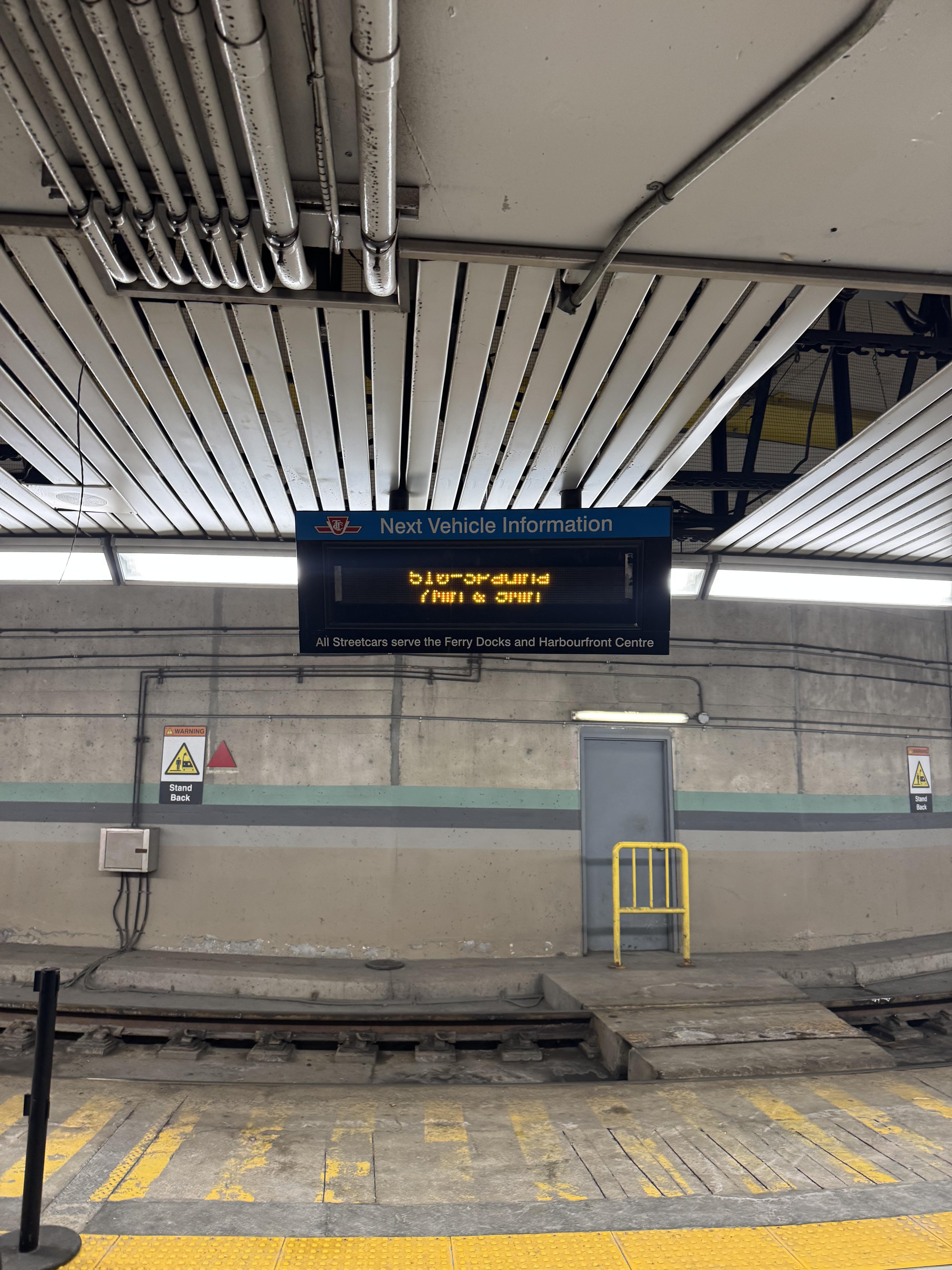
<p><strong>Make it look more like a TTC sign.</strong> The actual TTC sign at Union Station, despite having the same height as mine, shows the next 4 streetcars by alternating between streetcar lines every ~10 seconds and showing the next 2 cars for each.</p>

<figure>
  <img src="/assets/images/IMG_4985.jpg" alt="Union Station TTC streetcar sign" />
  <figcaption>Somehow I caught this mid-scanline.</figcaption>
</figure>

<p><strong>A front cover.</strong> Either in the form of a clear perspex sheet, or if I end up using it for other purposes, some kind of <a href="https://www.printables.com/model/719024-16x32-led-matrix-frame-with-diffuser-grid">3D printed diffuser</a>.</p>

<p><strong>Automatic orientation using an accelerometer.</strong> If I wanted the USB port to be on the opposite end of the sign I’d have to rotate it, but then I’d have to flip the text that’s being displayed in the ESP32 so it’s readable. However, the ESP32-Trinity project supports an accelerometer, which I could use to determine the orientation of the sign so I could just flip it and have the screen automatically rotate like a phone.</p>

<p><strong>Physical buttons.</strong> It’d be neat to have buttons to switch “apps” on the sign, e.g. if I wanted to switch between a stock ticker, news, and streetcar times. Bonus points if they were radio-button-esque.</p>

<p><strong>Configuration via web interface.</strong> Since the ESP32 is WiFi-connected anyway, it could host a web server where I could switch “apps” remotely, submit custom text to display on it for events, etc. You could even accept custom apps via the web interface in a higher level language like Lua.</p>

<h2 id="conclusion">Conclusion</h2>

<p>My original plan was to have the sign in the entrance of my condo, but for now the sign just sits on my desk. It actually has helped me leave the house just in time to catch the streetcar.</p>

<p>If anyone would like to make a display like this themselves, here’s the parts list, and it requires no soldering:</p>

<ul>
  <li><a href="https://www.adafruit.com/product/420">16x32 RGB LED Panel</a></li>
  <li><a href="https://esp32trinity.com/">Trinity-ESP32</a></li>
</ul>

<p>And in case the panels don’t already come with them (I don’t remember):</p>

<ul>
  <li>20mm x 10mm IDC Ribbon Cable (I just got mine on Amazon)</li>
  <li><a href="https://www.adafruit.com/product/4767">RGB LED Matrix power cable</a></li>
</ul>

<p>You can find the printable model for the case in OnShape <a href="https://cad.onshape.com/documents/8fa87bf746aefc0322efcf15/w/7725bca9d17383754a2856bd/e/eef66cd6a04190a0781c3b44?renderMode=0&amp;uiState=6970318db4889ed2a58c0728">here</a>, and the source code will be published soon.</p>

<div class="footnotes" role="doc-endnotes">
  <ol>
    <li id="fn:1" role="doc-endnote">
      <p>I realize I could’ve just use an app on my phone to see when the streetcar is coming, but that’s not as <em>cool</em>. <a href="#fnref:1" class="reversefootnote" role="doc-backlink">&#8617;</a></p>
    </li>
  </ol>
</div>]]></content><author><name></name></author><summary type="html"><![CDATA[Last September during my trip to the UK we became stranded at a small town train station because a tree had fallen on the tracks nearby. After waiting at the station in the rain for much too long, we decided to have a drink at a pub across the street until the service was restored.]]></summary></entry></feed>